
Lesson 2
Symbolic circuits and Expert Mode
Learn how to solve different types of symbolic circuits in Symbulator. Use Solve in Symbulator. And explore the powerful Expert Mode, for the ambitious user.
Last updated 2026-09-06
Here you will learn about the types of symbolic circuits and how to solve them in Symbulator, using Solve when needed, and — for the more adventurous — the powerful Expert Mode.
2.1About symbolic problems
The problem we saw in Lesson 1 was a numerical problem because it involved a numerical circuit: from the start, we knew the values of all its elements. None were unknown.
A circuit with one or more elements whose value we do not know is a symbolic circuit. A symbolic problem is one that involves a symbolic circuit. It gives me great joy when I encounter a symbolic problem, because the ability to simulate symbolic circuits is what sets Symbulator apart from other simulators.
I find it useful to distinguish between two types of symbolic problems:
- Purely symbolic problems use symbolic circuits whose answers are also symbolic, given as expressions of unknown variables. Solving them in Symbulator is as straightforward as solving numerical problems.
- Numerical-from-symbolic problems start with a symbolic circuit but ask for numerical answers. That is possible when the problem gives us more information about the circuit.
Numerical-from-symbolic problems can be solved in two ways. If they are simple — one or two unknown values, one or two numerical answers wanted — it is quicker to simulate the circuit symbolically and then solve for the numerical answers with the Solve card, under the results. If they are not simple, it is easier to use Expert Mode.
Let's see an example of each.
Solving a purely symbolic problem
Since Symbulator is natively a symbolic simulator, there is nothing special about solving a purely symbolic problem. The only limitation comes from the computing capacity of your device: while small circuits are solved almost instantly, large symbolic circuits can take longer to solve, and on top of that, they may produce expressions too large to be useful to a human.
Let's see a simple purely symbolic problem, from Fundamentals of Electric Circuits by Alexander and Sadiku (5th edition), from now on referred to as AS5.
AS5's Figure 2.29
Open in app ↗Open in split view

AS5's Figure 2.29
Solution
All the values in this circuit are variables: no element value is known. This is an example of a symbolic circuit. Imagine you are asked to find symbolic expressions for the current i, the voltage drop in R2, and the power consumed by R1 and R2. Since we are being asked to find symbolic answers from a symbolic circuit, this is a purely symbolic problem.
This is how I would describe this circuit. First, the nodes. The node called a in the schematic stays node a. The node called b is my ground, so it becomes node 0. The node between the two resistors I call c.
Then the elements. I name the source ev and the resistors r1 and r2, and give them variables for values: v for the source, r1 and r2 for the resistors. It is no problem that a symbolic value carries the same name as its element.
Type the three elements into the box, one to a line:
ev,a,0,v
r1,a,c,r1
r2,c,0,r2
Leave Type of analysis on Solve circuit, set Analysis to DC — direct current, and press Run Symbulator.
The answer comes back at once. To find the current i, we read ir1 or ir2. To find the voltage drop on r2, we read vr2.
Both are expressions rather than numbers:
which is the voltage divider you would have written by hand.
To find the power consumed in r2, we read pr2. To find the power delivered by the source, we read the power delivered row of the source's card, -pev.
It is this ability to simulate symbolically, as if it were nothing, that puts Symbulator in a league of its own. Symbolic answers from a symbolic circuit take no extra effort.
2.2Numerical from symbolic, with Solve
Getting numerical answers from a symbolic circuit, on the other hand, takes an extra step: Solve, as in this next example, or Expert Mode, as in the one after.
B11's Example 5.6, with Solve
Open in app ↗Open in split view
B11's Example 5.6
Solution
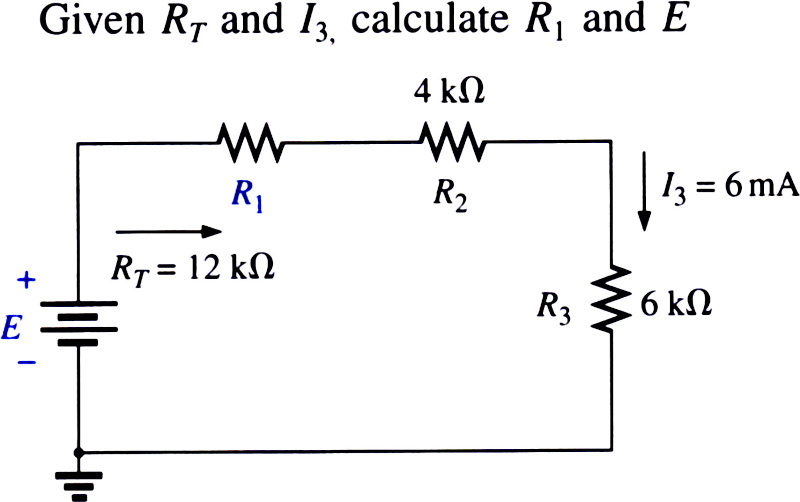
This is a very nice numerical-from-symbolic problem. We can solve it into numbers because, although it hides two values from us (the source E and the resistor R1), it gives us in exchange two answers (the equivalent resistance RT and the current I3) to solve for them with.
Since this circuit is structurally identical to B11's Example 5.7 solved in Lesson 1, we will use the same names for the nodes. The description is identical except for the values. Symbulator accepts numbers, variables or even algebraic expressions as values. Here I use e for source e, and r1 for resistor r1.
e,1,0,e
r1,1,2,r1
r2,2,3,4'k
r3,3,0,6'k
Run it in DC, as before.
A moment later Symbulator is done. From its symbolic answers and the answers the problem gives us, we write two equations and solve them for the two unknowns.
The problem says that I3 is 6 mA. In Symbulator, I3 is ir3, the current through resistor r3. Look at it and you will see an expression rather than a number, in terms of the two unknowns, e and r1:
This is what we call a symbolic answer. The problem also says that RT is 12 kΩ; the equivalent resistance as seen by the source e is re, which is:
We can then write two new equations and solve them for e and r1.
That is what the Solve card, under the results beside Evaluate, is for. It has two boxes.
In the first box, headed Equation(s) to solve in terms of the results, write the equations, using the same names the results use.
The shorthand works in these boxes too, so re = 12'k reads as 12000.
You can write the equations separated by and, like this:
re = 12'k and ir3 = 6'mOr one equation per line, like this:
re = 12'k
ir3 = 6'm
In the second box, headed Unknown(s) to solve for, name what you want found. You can write the unknowns separated by commas, like this:
e, r1Or one unknown per line, like this:
e
r1
Then press Solve equations.
An instant later we get the answers: the card lists e = 72.0 and r1 = 2000.0: a 72 V source and a 2000 Ω resistor. These are the right answers. Not many other circuit simulators allow this flexibility.
2.3Numerical from symbolic, in Expert Mode
Symbulator's true strength is seen in numerical-from-symbolic problems like the one we solved above, when we use its Expert Mode of simulation. Expert Mode cracks these problems open in a single call, and gives fully numerical answers whenever the problem provides as many answers as it hides values.
Expert Mode takes extra equations, unknowns and conditions in three boxes. Open the Expert Mode box and tick Enable Expert Mode to see them:
- Add equation(s) — one or many, separated by
andor one per line, written in the names the results use. - Add unknown(s) — one or many, separated by commas or one per line.
- Add condition(s) — one or many, separated by
andor one per line, for narrowing a solution down, which we will use later.
They apply to whatever analysis you run, so Expert Mode works the same way in DC, AC, FD and TR.
B11's Example 5.6, using ex
Open in app ↗Open in split view
Solution
We use the same circuit description as before, r1 included.
The problem gives us the two extra equations: the source sees 12 kΩ, and the current through R3 is 6 mA. They use the names the answers come back under, and the SI shorthand works here too:
e,1,0,e
r1,1,2,r1
r2,2,3,4'k
r3,3,0,6'kre = 12'k
ir3 = 6'me, r1Run it in DC. This time everything comes back numerical: the node voltages read v1 = 72 V, v2 = 60 V and v3 = 36 V, and at the foot of Results by element are the two unknowns, listed like any other answer: e = 72 and r1 = 2000. Both are right, and the whole circuit was solved with them in one step.
The speed advantage of Expert Mode is not necessarily evident in this simple problem. But it does give you an idea of what Expert Mode is all about: you get to hand Symbulator extra information before it solves, rather than after. Had this circuit been larger, the benefit in computation time would be clear.
2.4Instructive symbolic examples, solved
Numeric-from-symbolic, with Solve
HK5's Figure 1-24a (solve)
Open in app ↗Open in split view
Determine ix and vx in the following circuit:

I named the nodes thus: bottom is 0, top left is 1, top right is 2. I named the elements according to their value: this facilitates remembering who's who in the circuit. I also defined the resistors' nodes in the direction of the current indicated in the diagram.
e18,1,0,18
ra,1,0,ra
r6,1,0,6
r5,2,1,5
evx,2,0,vx
Explore the answers. Since ir5 (which we know is 12 A) is in terms of vx, we can find vx:
Solve it in DC, then use the Solve card:
ir5 = 12vxvx is 78 V, which is correct. The current ir6 already shows that ix is 3 A. The fact that we can find numerical answers in this problem can be quite puzzling until one realizes that ignoring the value of RA doesn't matter: due to the circuit's structure, it is not needed to answer the two questions we have been asked.
Numeric-from-symbolic, in Expert Mode
B11's Example 6.19 (Expert)
Open in app ↗Open in split view

This problem, having three unknown element values and three known answers, is a perfect candidate for Expert Mode. Below is my circuit description.
e,1,0,e
r1,1,0,2'k
r2,1,0,r2
r3,1,0,r3
Choose DC and, in Expert Mode, add these three equations:
ir1 = 8'm
ir2 = 10'm
ir3 = 2'm
Add these unknowns:
e, r2, r3Run it. Everything comes back numerical: e = 16, so E is 16 V, and ie = −0.02 A, so IS is 0.02 A. Both correct. The two resistors come back too: r2 = 1600 Ω and r3 = 8000 Ω.
B11's Example 7.12 (Expert)
Open in app ↗Open in split view
Determine R1, R2 and R3 for the voltage divider supply. Can 2W resistors be used?
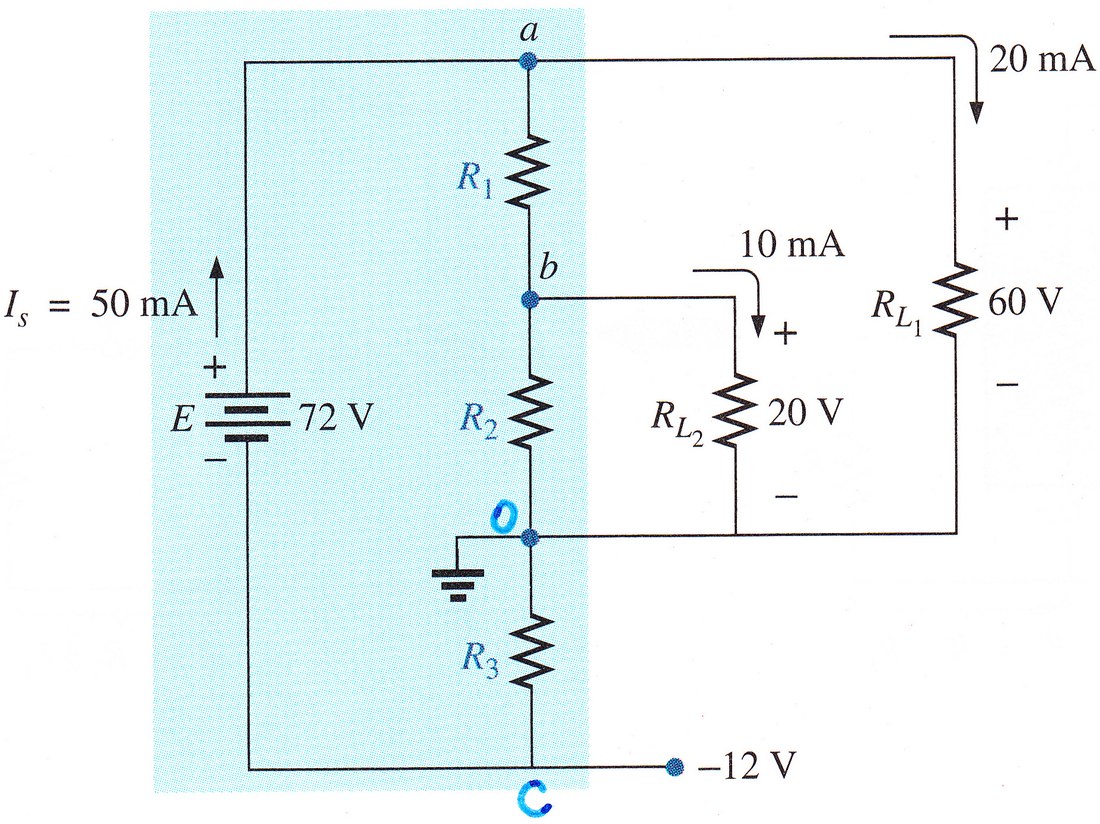
This problem is also perfect for Expert Mode, because: (a) the target is to obtain numerical values, and (b) we have N unknown element values, and in turn we are given N numerical answers. Here is how I solved it:
e,a,c,72
r1,a,b,r1
r2,b,0,r2
r3,0,c,r3
rl1,a,0,rl1
rl2,b,0,rl2
Choose DC and, in Expert Mode, add these five equations:
irl1 = 20'm
vrl1 = 60
irl2 = 10'm
vrl2 = 20
-ie = 50'm
List these five as the unknowns to solve for:
r1, r2, r3, rl1, rl2Run it, and read the answers straight off the results: r1 = 1333.3 Ω, r2 = 1000 Ω, r3 = 240 Ω. These are correct.
The power consumed in each resistor is given in:
Since all are smaller than 2W, it is possible to use 2W resistors in the design.